Choosing the right podcast editing software is crucial for any aspiring or established podcaster. This guide delves into the essential factors to consider, from understanding the different types of software to evaluating pricing models and user interfaces. We’ll equip you with the knowledge to select the ideal tool that fits your needs and budget, enabling you to produce high-quality podcasts with ease.
This comprehensive exploration covers everything from fundamental features like audio recording and editing to advanced functionalities like mixing and mastering. We’ll also analyze budget considerations, user-friendliness, additional features, compatibility, and community support. By the end, you’ll have a clear roadmap to selecting the podcast editing software that empowers your creative vision.
Essential Features for Podcast Editing
Choosing the right podcast editing software is crucial for producing high-quality audio content. Beyond user-friendliness and a clean interface, essential features dictate the professional polish and listenability of your podcast. A robust suite of tools ensures a smooth editing process, from initial recording to final mixdown.Professional-grade podcast editing necessitates a suite of features designed to enhance audio quality and facilitate seamless workflow.
These features range from basic editing tools to advanced audio manipulation techniques. A good understanding of these features is paramount for any aspiring or established podcaster.
Audio Recording Quality
The quality of the initial recording significantly impacts the final product. High-quality audio captures nuances in the speakers’ voices, allowing for a more engaging listening experience. Different software handles audio differently. Some software allows for multiple input channels, enabling simultaneous recording of different sources (e.g., guests, music). This flexibility ensures that the audio capture aligns with the specific needs of your podcast.
The bit rate, sample rate, and channel configuration are vital parameters that directly influence the clarity and fidelity of the audio recording.
Noise Reduction Tools
Ambiance and background noise are often problematic in audio recordings. Robust noise reduction tools are essential for minimizing distractions and enhancing the clarity of the podcast. Effective noise reduction algorithms can remove unwanted sounds without distorting the original audio. Sophisticated software may offer adaptive noise cancellation, which adjusts to changing noise levels during recording. This feature is especially helpful in environments where noise levels fluctuate, providing a consistently clean recording.
Audio Mixing/Mastering Capabilities
Mixing and mastering are crucial steps in podcast production. Mixing combines different audio tracks, such as voice, music, and sound effects, to create a cohesive and balanced audio landscape. Mastering optimizes the overall volume, equalization, and dynamics of the podcast to ensure optimal sound quality across various listening devices. A good podcast editing software should offer a comprehensive suite of mixing tools, including equalization controls, compressor plugins, and effects processors.
This allows for meticulous control over the final sound of the podcast.
Editing Tools for Podcast Production
A wide range of editing tools significantly impact the production process. They facilitate precise control over the audio content, enabling podcasters to craft a polished and professional final product. These tools enable podcaster to refine audio segments, ensuring consistency and a smooth listening experience.
| Editing Tool | Usefulness in Podcasting |
|---|---|
| Trimming | Removes unnecessary silence or unwanted audio segments from the beginning or end of a recording. This ensures a more focused and engaging podcast episode. |
| Splitting | Divides a recording into separate segments, allowing for easier editing and organization of different parts of the episode. This is vital for segmenting interviews or adding sound effects. |
| Fades | Gradually increases or decreases the volume of an audio segment, creating smooth transitions between different sections of the podcast. Fades are often used to introduce or conclude segments and to add a professional touch. |
| Audio Effects | Add depth and character to the podcast through the use of sound effects, music, or other audio elements. This enhances engagement and creates a unique atmosphere for the podcast. |
Budget Considerations for Podcast Editing Software

Choosing the right podcast editing software is crucial for producing high-quality audio. However, budget plays a significant role in the selection process. Understanding the various pricing models, free alternatives, and potential hidden costs can help podcasters make informed decisions. Different software packages offer varying features, impacting the overall cost-effectiveness of the choice.The cost of podcast editing software can vary widely, ranging from free options with limited functionality to expensive professional packages with comprehensive tools.
Factors like the desired level of features, the frequency of podcasting, and the complexity of post-production tasks influence the optimal choice for each individual podcaster.
Pricing Models of Podcast Editing Software
Different podcast editing software employs various pricing models. Some offer a free trial period to evaluate the software before committing to a purchase. Others provide a tiered subscription model, allowing users to select a package based on their needs and budget. Still others opt for a one-time purchase model, typically offering a more comprehensive set of features but potentially higher initial investment.
Understanding these differences is key to making a sound financial decision.
Examples of Free and Paid Podcast Editing Software
Free options like Audacity, a popular open-source audio editor, are available for basic editing tasks. They often lack advanced features found in paid software, such as advanced audio restoration tools, detailed mixing controls, and sophisticated sound effects libraries. Paid software options such as Adobe Audition or GarageBand offer more comprehensive editing capabilities and professional-grade tools, often with higher price points.
For those with a larger budget, specialized podcast editing software packages are available, providing a tailored solution for podcast production needs.
Hidden Costs Associated with Podcast Editing Software
Beyond the initial cost of the software, consider potential hidden costs. These might include necessary hardware upgrades (e.g., better microphones, sound interfaces) to achieve the best audio quality, particularly if your current setup isn’t optimized for podcasting. Additionally, consider the cost of learning the software, as a steep learning curve might require additional time and resources. Some software may require additional plug-ins or extensions to fully utilize its features, adding further costs.
Comparison of Pricing Tiers
| Software Option | Pricing Tier | Key Features | Potential Hidden Costs |
|---|---|---|---|
| Audacity | Free | Basic audio editing, recording, and exporting | Limited advanced features, potential need for additional plugins |
| GarageBand | Free/Paid | Easy-to-use interface, basic recording and editing, and limited mixing options. Paid version includes more comprehensive features. | Potential need for upgrades or additional plug-ins. Paid version is a one-time purchase, but limited features. |
| Adobe Audition | Subscription | Comprehensive audio editing, mixing, mastering, and advanced sound design tools | Monthly/yearly subscription fees, potential for additional plug-ins or extensions |
| Specialized Podcast Editing Software | Subscription/One-time purchase | Tailored features for podcast production, including automated transcription, noise reduction, and specialized effects. | High initial cost for specialized features, potentially requiring additional training |
Understanding these varying pricing models and hidden costs empowers podcasters to make informed choices aligned with their specific needs and financial constraints. This allows for a balanced approach to budgeting and maximizing their podcast production quality.
User-Friendly Interface and Learning Curve
A user-friendly interface is paramount when choosing podcast editing software. A smooth and intuitive interface directly impacts the efficiency of your workflow, allowing you to focus on creating high-quality content rather than struggling with complex software. This aspect is particularly crucial for podcasters of all experience levels, from beginners to seasoned professionals. Different software caters to various levels of technical proficiency, making it essential to consider the learning curve alongside the features.A simple and intuitive interface streamlines the podcast editing process.
Users can quickly locate and manipulate audio files, apply effects, and export their final product with ease. This reduces frustration and allows for more focused creative work, ultimately leading to higher-quality podcasts. Complex software, on the other hand, can be time-consuming to learn and navigate, potentially hindering the creative flow.
Ease of Use Across Different Software Options
The ease of use and learning curve vary significantly between different podcast editing software options. Some programs are designed for absolute beginners, while others are more suited to experienced users. This section provides a comparison of ease of use and learning curve for various podcast editing software options.
| Software | Ease of Use (1-5, 5 being easiest) | Learning Curve (1-5, 5 being shortest) | Target User |
|---|---|---|---|
| Audacity | 4 | 3 | Beginners and intermediate users. Excellent for basic tasks. |
| GarageBand | 4.5 | 2 | Beginners to intermediate users, particularly Mac users, with strong emphasis on ease of use. |
| Adobe Audition | 3 | 4 | Experienced users and professionals requiring advanced editing capabilities. |
| Descript | 4.8 | 3.5 | Beginners and intermediate users. Known for its intuitive features and ease of use. |
| Cakewalk by BandLab | 4 | 3 | A broad range of users. Offers a balanced approach for many different experience levels. |
“Intuitive software design minimizes the time spent on learning and allows for more focused creative work.”
The table above provides a general guideline. Individual experiences may vary based on prior technical experience and familiarity with audio editing concepts. Ultimately, the best software for you depends on your individual needs and level of comfort with technical tools.
Additional Features and Integrations
Beyond core editing capabilities, robust podcast editing software often boasts a suite of supplementary features that enhance the production process. These additional tools streamline workflow, expand creative possibilities, and ultimately contribute to a polished final product. Careful consideration of these supplementary features is crucial for selecting the optimal software for your podcasting needs.
Audio Effects and Transitions
A significant advantage of many podcast editing programs is the inclusion of a variety of audio effects and transitions. These features can dramatically enhance the listening experience by adding dynamism and interest. Examples include fades, crossfades, echo effects, and reverb. Masterful use of these tools can smooth transitions between segments, create dramatic pauses, or enhance the impact of key moments in your podcast.
Precise control over these effects is vital for a professional-quality sound.
Music Libraries and Sound Effects
Many podcast editing programs offer access to extensive libraries of royalty-free music and sound effects. This significantly reduces the need to source these elements externally, saving time and effort. These libraries are often categorized for easy selection based on mood, genre, or specific context. The quality and comprehensiveness of these libraries vary between software packages. Effective integration of appropriate sound effects can heighten the impact of specific narrative points or create a particular atmosphere.
Integrations with Other Tools
The integration capabilities of podcast editing software are increasingly important. A seamless workflow between different tools used in podcast production is highly valuable. For example, integration with transcription services enables a more efficient post-production process, facilitating the inclusion of accurate transcripts for accessibility and research purposes. Further, integrations with social media platforms allow for direct sharing of podcast episodes, expanding your audience reach.
These integrations streamline the overall production process, fostering greater efficiency and productivity.
Table of Integrations and Benefits
| Integration | Benefit |
|---|---|
| Transcription Services (e.g., Otter.ai, Trint) | Automated transcription speeds up post-production, enabling accurate captions, subtitles, and searchable transcripts for accessibility, , and research. |
| Social Media Platforms (e.g., Spotify, Apple Podcasts) | Direct sharing of episodes to platforms enhances audience reach, simplifies distribution, and allows for interaction through comments and ratings. |
| Collaboration Tools (e.g., Google Drive, Dropbox) | Facilitates seamless file sharing and collaboration among team members, enabling efficient project management and reduced delays in production. |
| CRM Platforms (e.g., Mailchimp, Constant Contact) | Streamlines communication with listeners, allowing for targeted marketing campaigns and promotions. This integration supports building and nurturing a loyal listener base. |
Software Compatibility and Platform Support
Choosing the right podcast editing software depends not only on its features and price but also on its compatibility with your operating system and workflow. A program that works seamlessly on your preferred platform and device will contribute significantly to your overall podcasting experience. Understanding platform compatibility ensures a smooth and efficient editing process.Selecting software compatible with your current setup is essential for a seamless podcasting journey.
This ensures you can use the software on the devices you frequently use, minimizing any potential workflow disruptions. Different operating systems often have distinct software ecosystems, leading to varying degrees of compatibility with specific applications.
Operating System Compatibility
Different podcast editing software programs have varying degrees of support for various operating systems. This compatibility directly impacts the accessibility and usability of the software for a wide range of users. Understanding the specific compatibility ensures that the chosen software can be used across your preferred devices.
- Windows: Many podcast editing programs are designed to function effectively on Windows-based systems, offering a robust and established user base. This compatibility often means extensive support for a variety of audio file formats, plugins, and extensions. Many popular choices for podcast editing software are compatible with Windows, ensuring a reliable experience for a large segment of users.
- macOS: Apple’s macOS ecosystem has its own set of compatible applications. The compatibility of podcast editing software with macOS often involves a streamlined integration with other Apple products and services, potentially enhancing the workflow for users already immersed in the Apple ecosystem. Many popular editing programs cater to macOS users with their design and features.
- iOS: While not all podcast editing software is specifically designed for mobile use, some offer iOS apps that allow for basic editing tasks on tablets and smartphones. This mobility is beneficial for users who prefer to work on the go or need a quick way to make adjustments to their podcasts. However, comprehensive editing capabilities are typically found in desktop software rather than iOS applications.
- Android: Similar to iOS, the Android ecosystem offers some podcast editing apps. These often provide limited editing capabilities compared to dedicated desktop software. The workflow on Android devices is usually tailored for smaller tasks and may not be ideal for extensive editing. Android users might need to integrate with other applications for a more comprehensive editing experience.
Workflow Differences Across Platforms
The workflow for podcast editing can differ significantly based on the operating system. For instance, macOS users might find a more intuitive interface and integration with other Apple applications, while Windows users might have more options for third-party plugins and extensions. iOS and Android platforms often offer limited functionality compared to desktop software, primarily focused on basic editing tasks.
| Software | Windows | macOS | iOS | Android |
|---|---|---|---|---|
| Audacity | Yes | Yes | Limited | Limited |
| GarageBand | No | Yes | Yes | No |
| Adobe Audition | Yes | Yes | No | No |
| Adobe Premiere Pro | Yes | Yes | No | No |
Community Support and Resources
A strong online community is invaluable when navigating the complexities of podcast editing software. Active forums and support channels provide readily available assistance, allowing users to troubleshoot issues, learn from others’ experiences, and discover creative solutions to editing challenges. This support extends beyond simple technical help, encompassing the exploration of innovative editing techniques and creative application of the software.Community support and readily accessible tutorials are crucial for effectively utilizing podcast editing software.
They provide an essential layer of guidance beyond the software’s documentation, allowing users to gain practical knowledge and insights from others who have already navigated the software’s intricacies. This empowers users to fully leverage the features and functionalities available.
Examples of Community Forums and Support Channels
Various podcast editing software platforms have dedicated online communities for users to connect, ask questions, and share experiences. For example, Audacity boasts a vibrant online forum and active user community. This community provides a platform for users to address technical issues, share tips, and discuss best practices for audio editing. Similarly, Adobe Audition users benefit from Adobe’s extensive online support resources and user forums, facilitating interaction and collaborative problem-solving.
GarageBand, offered as part of Apple’s ecosystem, has online resources and support groups to aid users.
Value of Online Communities and Support Systems
Online communities foster a collaborative learning environment. Users can benefit from the collective knowledge and experience of others, learning from the solutions to similar problems, which can save significant time and effort. These communities facilitate knowledge sharing and the development of innovative approaches to podcast production. Furthermore, they offer a platform to connect with fellow podcasters, fostering a supportive and collaborative environment.
Availability of Tutorials and Learning Materials
Numerous resources are available to enhance user understanding and proficiency in podcast editing software. Comprehensive tutorials are frequently available on platforms like YouTube, offering step-by-step instructions and practical demonstrations. These tutorials often cover specific features, techniques, or workflows, allowing users to build their skills incrementally. Many software developers themselves publish instructional materials on their websites, including tutorials and user guides, providing direct support from the source.
Resources for Learning About Using Different Software
The internet offers a wealth of learning materials for different podcast editing software. Websites dedicated to podcasting often host articles and tutorials on specific software. Blogs and online articles provide practical tips and tricks for utilizing specific software effectively. Furthermore, many online video platforms host tutorials and demonstrations that guide users through the various functionalities and workflows.
Examples of Different Software in Action
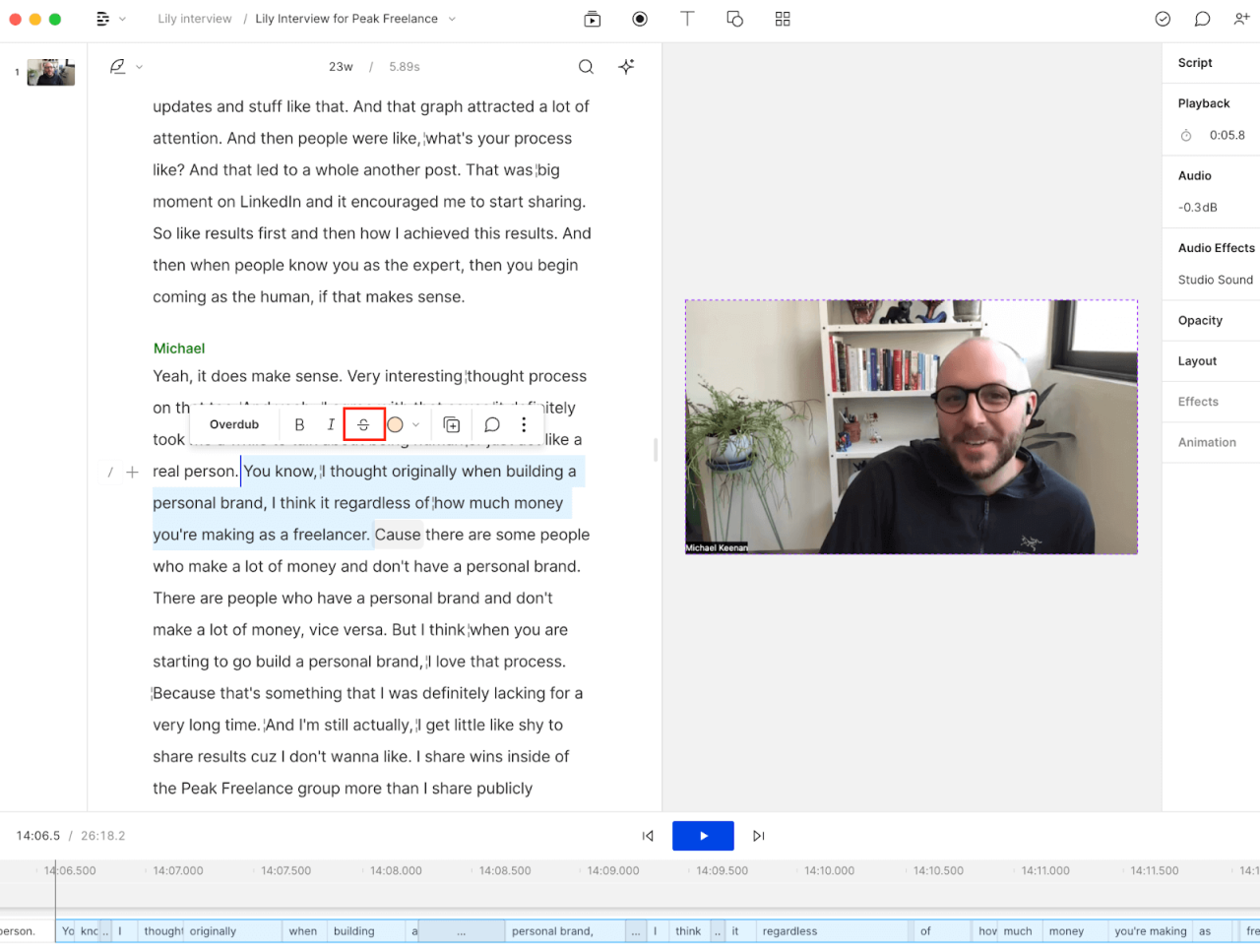
Exploring the diverse landscape of podcast editing software reveals a range of features and workflows. Understanding how different programs function in practice can greatly assist in choosing the optimal solution for your podcasting needs. Different software caters to various podcasting styles and production requirements, making a thorough comparison essential.Different podcast editing software offers distinct strengths and weaknesses, impacting the overall user experience.
Some programs excel in audio mixing and mastering, while others prioritize intuitive interfaces for beginners. By examining specific examples, we can gain valuable insights into the nuances of each platform.
Audacity
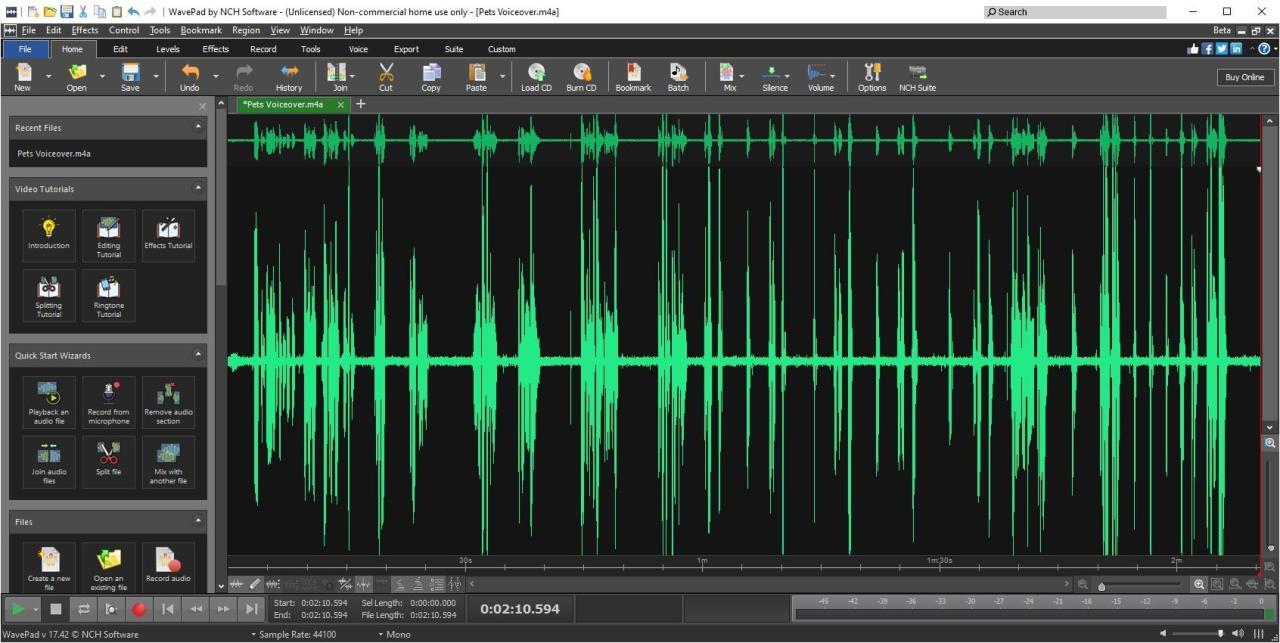
Audacity is a free and open-source audio editor known for its versatility and extensive feature set. Its strength lies in its ability to handle a wide array of audio tasks, including recording, editing, and mixing. Importantly, its free nature makes it an attractive option for those on a budget. Its interface, while not as visually sophisticated as some commercial options, is intuitive for those comfortable with basic editing tools.
Adobe Audition
Adobe Audition is a powerful professional-grade audio editor known for its advanced features. Its comprehensive toolset, including sophisticated mixing and mastering capabilities, makes it a popular choice for podcasts requiring high-quality sound. The learning curve is steeper compared to simpler options, but the program’s advanced features enable significant control over the audio production process. Its integration with other Adobe Creative Cloud applications is a significant advantage for those working within a broader creative workflow.
GarageBand
GarageBand, readily available on macOS and iOS, is a user-friendly option for beginners. Its intuitive interface and built-in effects make it a practical choice for those seeking a straightforward editing experience. GarageBand’s strengths lie in its ease of use and accessibility, making it an ideal entry-point for aspiring podcasters. Its limitations are apparent when compared to more advanced professional programs.
Comparison Table
| Software | Pros | Cons |
|---|---|---|
| Audacity | Free, versatile, robust editing capabilities, open-source, simple interface | Limited advanced features, potentially less user-friendly for complex projects, fewer advanced integrations |
| Adobe Audition | High-quality audio editing, sophisticated mixing and mastering, advanced features, integration with other Adobe products | Steeper learning curve, requires a subscription, not suitable for every project |
| GarageBand | User-friendly interface, intuitive for beginners, readily accessible, affordable | Limited advanced features, less control compared to professional software, not ideal for complex productions |
Illustrative Example
Imagine a podcast discussing environmental issues. Using Audacity, an editor could easily remove background noise from interviews, enhance audio clarity, and adjust levels. Adobe Audition, on the other hand, could be used for sophisticated audio mixing, creating a balanced and immersive listening experience. GarageBand might be employed for basic edits and adding simple sound effects, suitable for introductory podcasts.
These examples highlight how different software choices can affect the final audio quality and the production process.
Outcome Summary
In conclusion, choosing the best podcast editing software is a multifaceted process that demands careful consideration of your specific needs and resources. This guide has highlighted the key aspects, from essential features and budget constraints to user experience and platform compatibility. By evaluating the various software options, their strengths and weaknesses, and the comprehensive support available, you can confidently select the ideal tool to elevate your podcast production to the next level.